Clone a campaign
Cloning a campaign lets you duplicate an existing campaign.
Note: This option will not appear unless you created the campaign.
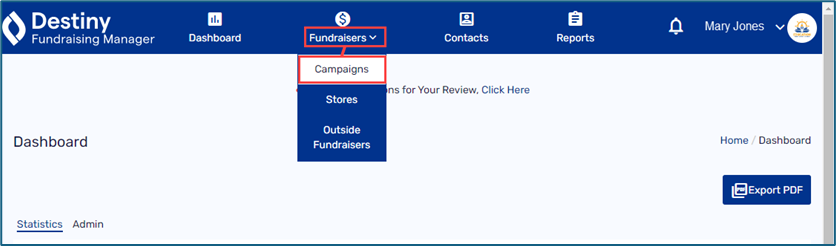
1. In the header, select Fundraisers > Campaigns.
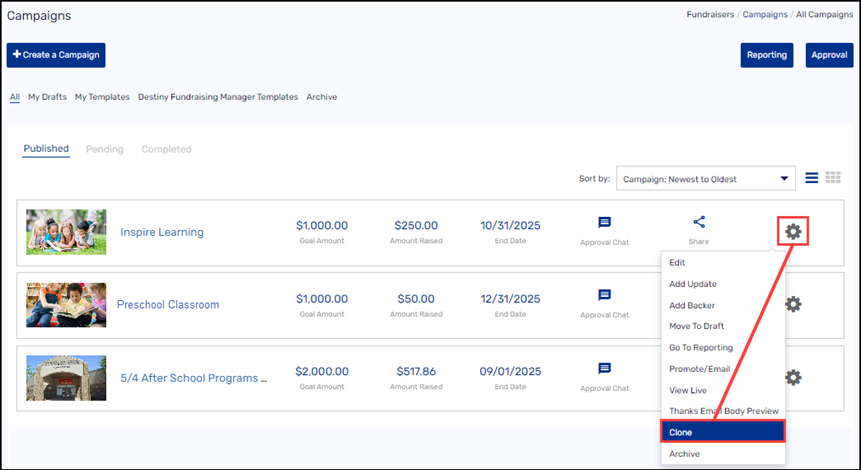
2. Find the campaign you want to clone.
3. Select the gear icon >Clone.
4. Make edits to any of the campaign details.
5. Do any of the following:
-
To submit your campaign for approval, click Submit to Bookkeeper. The bookkeeper will enter the accounting code and submit the campaign for district/school approval.
-
To see how your campaign will appear to donors, click Preview.
-
To complete the campaign details later, select Save As > Save As Draft.
-
To save this setup for a future campaign, select Save As > Save As Template.
See Create a campaign.
For additional help, contact techsupport@follettsoftware.com.